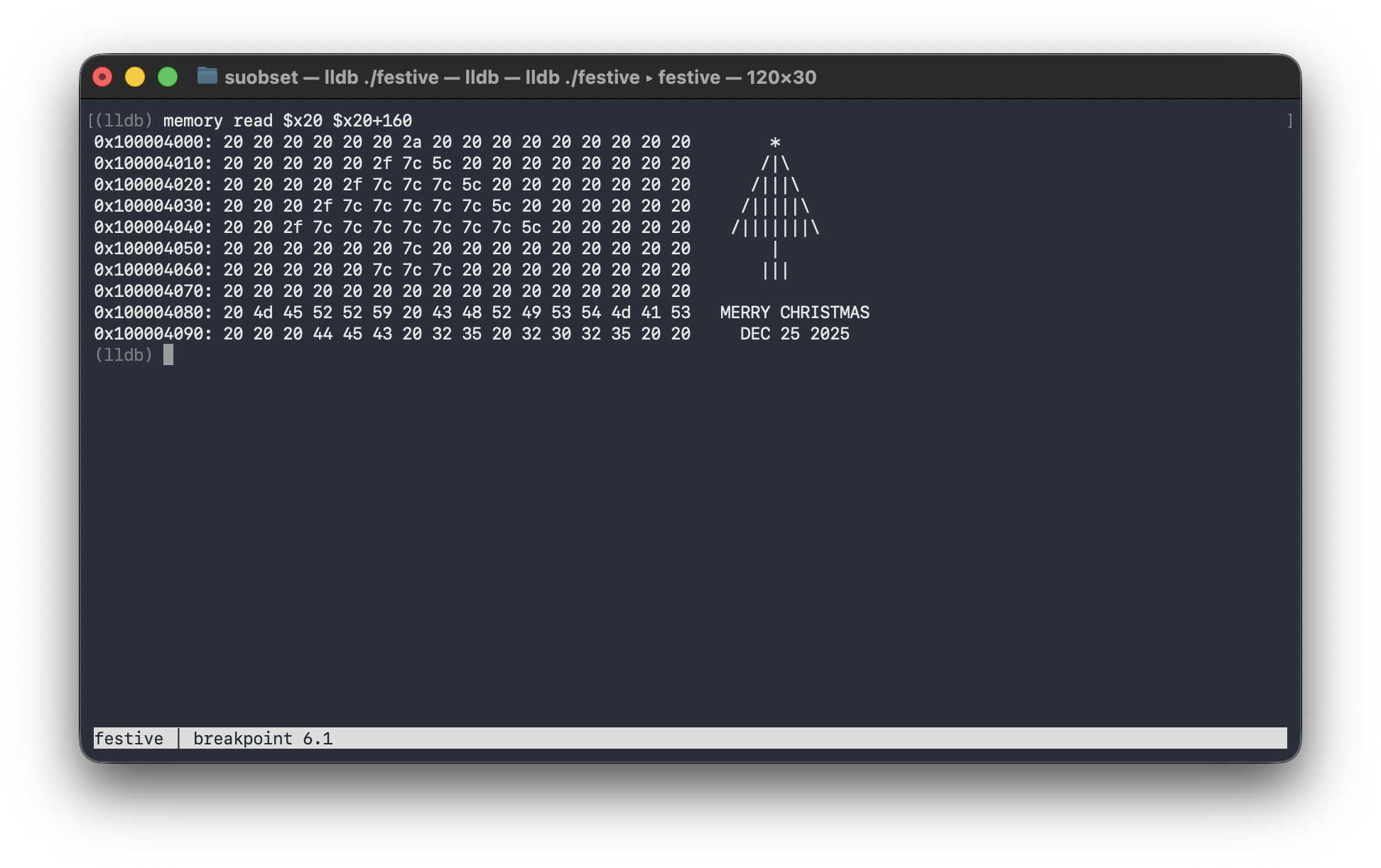
Every year I try to send a Christmas greeting that’s a little more unhinged than the last. Last year it was ASCII art in Vim on my iPhone. It was ok, and did spark an interest in running Vim on iSH on iOS, but nothing out of the box.
This year I wanted to top it, and I figured, why not hide a Christmas tree inside ARM64 assembly and reveal it through a debugger?
The Concept
The idea is simple: write a program that looks like meaningless hex values in the source, but when you inspect memory in LLDB, a Christmas tree appears in the ASCII column on the right.
LLDB’s memory read command dumps 16 bytes of hex per row, followed by their ASCII representation. If we write exactly 16 characters per row into a contiguous block of memory, the art lines up perfectly in that right column. The source code is a wall of mov and strb instructions. The output is holiday cheer.
Why ARM64?
I’m on an M4 MacBook Air, so we’re writing AArch64 assembly - Apple Silicon’s native instruction set. If you’re on Intel, none of this code will work. You’d need completely different registers (rax, rbx instead of x0, x1), different memory access patterns, and different syscall conventions. The ARM vs x86 divide is real.
Setting Up the Canvas
.data
canvas: .space 256

.text
_main:
    adrp x20, canvas@PAGE
    add x20, x20, canvas@PAGEOFF
We allocate 256 bytes of zeroed space in the data section — our drawing canvas.
The adrp/add two-step is how ARM64 loads addresses. ARM instructions are fixed-width (4 bytes), so you can’t just mov a 64-bit address into a register like x86 can. Instead, adrp loads the page-aligned base address, and add offsets to the exact symbol. It’s verbose, but it’s the ARM way. After this, x20 points to our canvas.
The ARM64 Immediate Problem
Here’s where I ran into my first quirk. I originally tried:
mov x7, #0x584D4153 ; 'XMAS' as a 32-bit value
And the assembler yelled at me:
error: expected compatible register or logical immediate
ARM64’s mov instruction can only handle 16-bit immediates directly. Anything larger needs to be built up with movz (move zero-extended) and movk (move keep):
movz x7, #0x584D, lsl #16   ; load upper half
movk x7, #0x4153            ; keep lower half, insert 'AS'
This is one of those things where x86 just lets you mov eax, 0xDEADBEEF and ARM makes you work for it. The tradeoff is that ARM’s fixed-width instructions make pipelining and decoding simpler, but the programmer pays the complexity tax.
For the Christmas tree, I mostly avoided this by sticking to small values that fit in 16 bits — ASCII codes like 0x2A (star) or 0x7C (pipe) are single bytes anyway.
Drawing Byte by Byte
Here’s where it gets tedious. Each character is written individually using strb (store byte) or strh (store halfword, for two identical characters at once):
star:
    ; Row 0: "      *         " (star on top, 16 chars)
    mov w0, #0x2020             ; two spaces
    strh w0, [x20, #0]
    strh w0, [x20, #2]
    strh w0, [x20, #4]
    mov w0, #0x2A               ; '*'
    strb w0, [x20, #6]
    mov w0, #0x2020
    strh w0, [x20, #7]
    strh w0, [x20, #9]
    strh w0, [x20, #11]
    strh w0, [x20, #13]
    mov w0, #0x20
    strb w0, [x20, #15]
A few notes:
w0is the 32-bit view ofx0. When you’re storing bytes or halfwords, you usewregisters.strhstores 2 bytes (a halfword), which is why#0x2020writes two spaces at once.- The offset in brackets is the byte offset from
x20. Row 0 is bytes 0-15, row 1 is 16-31, etc.
The ASCII table is your friend here: 0x2A is *, 0x2F is /, 0x5C is \, 0x7C is |, 0x20 is space. The tree is built character by character — star first, then the branches widen row by row with /|||...\ patterns, then the trunk, then the message.
The Message
message:
    ; Row 8: " MERRY CHRISTMAS" (exactly 16 chars)
    mov w0, #0x20               ; space
    strb w0, [x20, #128]
    mov w0, #0x4D               ; M
    strb w0, [x20, #129]
    mov w0, #0x45               ; E
    strb w0, [x20, #130]
    mov w0, #0x52               ; R
    strb w0, [x20, #131]
    strb w0, [x20, #132]        ; R again
    mov w0, #0x59               ; Y
    strb w0, [x20, #133]
    ; ... and so on
“MERRY CHRISTMAS” is 15 characters, so I padded with a leading space to hit exactly 16. Same deal with “DEC 25 2025” on the next row. The alignment matters — if you’re off by one byte, the whole thing shifts and looks wrong.
Festive Registers
While we’re at it, why not load some holiday hex into the registers?
    mov x0, #0xDEC              ; DEC(ember)
    mov x1, #0x25               ; 25(th)
    mov x2, #0x2025             ; 2025
    mov x3, #0xCAFE             ; coffee
    mov x4, #0xF00D             ; food
    mov x5, #0xBEEF             ; dinner
    mov x6, #0x1CE              ; ice
    mov x7, #0xC01D             ; cold
Classic hex speak. When you run register read x0 x1 x2 x3 x4 x5 x6 x7, you get:
x0 = 0x0000000000000dec
x1 = 0x0000000000000025
x2 = 0x0000000000002025
x3 = 0x000000000000cafe
x4 = 0x000000000000f00d
x5 = 0x000000000000beef
x6 = 0x00000000000001ce
x7 = 0x000000000000c01d
0xDEC 0x25 0x2025 — December 25, 2025. Plus CAFE, FOOD, BEEF for Christmas dinner, and ICE, COLD for the weather.
Exiting Cleanly
done:
    mov x0, #0              ; exit code 0
    mov x16, #1             ; syscall number for exit
    svc #0x80               ; supervisor call
On ARM64 macOS, syscalls go through svc #0x80 with the syscall number in x16. This is different from Linux ARM64 (which uses x8 for the syscall number) and completely different from x86-64 (which uses syscall instruction with rax). Every platform does it differently.
Exit code 0 means success. Holiday cheer delivered.
Building It
as -o festive.o festive.s
ld -o festive festive.o -l System -syslibroot `xcrun -sdk macosx --show-sdk-path` -e _main
The linker flags are macOS-specific:
-l Systemlinks against libSystem (required for the syscall to work)-syslibrootpoints to the SDK path-e _mainsets the entry point (macOS expects the underscore prefix)
If you forget any of these, you’ll get cryptic linker errors. Ask me how I know.
The Reveal
lldb festive
(lldb) b done
(lldb) r
(lldb) memory read $x20 $x20+160
And there it is:
Hex on the left, Christmas tree on the right. The message emerges from what looks like gibberish bytecode.
LLDB GUI Mode
For extra flair, LLDB has a curses-based GUI. The labeled sections in the code (star:, tree:, trunk:, message:, done:) double as breakpoint targets:
(lldb) b main
(lldb) b star
(lldb) b tree
(lldb) b trunk
(lldb) b message
(lldb) b done
(lldb) r
(lldb) gui
Press c to continue between breakpoints and watch the instruction pointer move through each “act” of the tree being drawn. At done, hit Esc to drop back to the command line and run memory read $x20 $x20+160 for the grand finale.
The GUI mode is a nice TUI with panes for source, threads, and variables — though the memory view requires you to drop back to the command line. Still, it makes for a fun demo where you can narrate the tree growing.
Merry Christmas :D