Disclaimer: This article uses an example transcript from a simulated call with dummy data. No confidential data with regards to any institution or lab is included in this writeup. This project was done with the author’s personal devices, on their personal time.
Quick General WWDC 2026 Thoughts
It’s no secret: I absolutely love the Macintosh! In my eyes, it’s an almost perfect blend of having a powerful UNIX environment without sacrificing broad compatibility. That’s why I’ve tuned in to every WWDC since around 2017, usually jumping into the first macOS beta the very day it launches.
I did the same for macOS Tahoe, and I’m doing it again with macOS Golden Gate.

For ages, iOS has inspired awesome feature upgrades in macOS. But over time, a few (read: lot of) bugs have sneaked in. This has made people request Apple for a “Snow Leopard” update. OS X Snow Leopard delivered 0 new features, improved stability, and dropped support for the PowerPC architecture, going Intel exclusive. Golden Gate promises on the exact changes: bug improvements, stability, and dropping support for Intel Macs, going Apple Silicon exclusive.
Beautiful.
Apple Intelligence (for real this time)
The money-graph for any given WWDC is the Platforms State of the Union: the live session right after the main WWDC that actually dives into the technical aspects of all the new changes that are coming (the main presentation has a more general audience, and high level discussions now).
A huge part of this session was the long-awaited unveiling of Apple Intelligence, powered by new Foundation Models developed in partnership with Google, leveraging the Gemini models. As part of this Apple has released a slew of Apple Intelligence updates.
Before we begin: Privacy
Apple has framed privacy as non-negotiable to the design of this entire stack. The system prefers on-device inference wherever possible, and when a query must go to the cloud, it routes through Private Cloud Compute—an architecture where user data is used only to fulfill the request, is not stored after completion, and cannot be accessed by Apple or third parties. Conversation logs in the new Siri app are stored end-to-end encrypted in iCloud, and Apple has opened PCC to independent security researchers to verify these guarantees.
I’m not a fan of generative AI in the creative sense: models that produce new images, music, or art trained on work scraped without consent from artists who never agreed to it. But I do think there’s a genuinely good version of this technology, and it looks like this: local, private, no training on your personal data in some server farm, and focused on actually helping you get things done. A tool, not a content factory.
Ollama already makes this real for anyone willing to spend an afternoon with it. If you have any recent laptop (any Mac with Apple Silicon and decent RAM, or PC with NPU/GPU), you can pull and run open-weight & open-source models locally on your own hardware.
The on-device emphasis in Foundation Models points in the same direction, and that matters environmentally too. Every query is handled locally. Running intelligence on-device rather than routing every request through remote GPU clusters is quietly one of the most concrete ways local-first AI contributes to that goal—fewer server roundtrips, less energy drawn from the grid, less strain on an already taxed global compute infrastructure.
Developer Announcements
The biggest developer-side announcement is the new LanguageModel protocol built into the Foundation Models framework. This is a public Swift interface that lets apps swap between Apple Foundation Models, Google Gemini, and Anthropic’s Claude via Swift Package Manager with no session-code changes. A new Core AI framework also gives developers a native way to run other local models on Apple Silicon. Apple also announced free Private Cloud Compute access for developers with fewer than two million first-time App Store downloads, image input support, and confirmed the Foundation Models framework will go open source later this summer. New built-in tools include BarcodeReaderTool, OCRTool (backed by Vision), and a Spotlight-powered search tool for fully local RAG.
This is the piece I’ll actually be digging into for the rest of this post.
Foundation Models (& the CLI harness)
As part of the new release, Apple has created multiple ways to include Apple Intelligence in a given app/workflow. Core AI is a completely new framework that helps run local LLMs on device. However, apps and services can also use the Foundation Models already present on devices that have Apple Intelligence enabled.
One of the most interesting parts of the new updates to developer/hobbyist tooling, is the new CLI interface to interact with the Foundation Models (inspired by the countless other CLI AI harnesses). You can invoke it using the fm command on Terminal.

You can enter into a chat mode:

Apple Foundation Model Chat in Background, Ollama with Gemma 4 MLX in foreground. Notice the spike in GPU usage when I invoked either model. Since the Gemma 4 model running in Ollama is a Thinking model, it also runs through the entire thinking process.
This is all offline, with no data leaving my computer!!
This, to me, unlocks an entirely new direction to explore in my personal notetaking & local LLM programming journey, especially if I can just use these models for my workflows and not have to deal with duplicate Ollama models on limited 256GB storage.
Existing Meeting Notes workflow.
The Foundation Model CLI Harness can also serve an API to a local URL. This is incredibly similar to how Ollama works.
This is already amazing, and you can get to do this tinkering without any Apple Developer Subscription. As long as you have an Apple Silicon Mac with a decent amount of RAM and storage, this should be good to go (for context: I use a base 16/256 M4 MacBook Air).
One of my most used apps is Anarlog, with is a locally-running Open-Source alternative to Granola. On surface, it is a pretty simple app. During any meeting (or when manually invoked), it MITMs the Microphone and Speaker on your laptops, records audio on both sides, and transcribes the audio. At the end of the meeting, it uses any AI model provider of your choosing (including Ollama mentioned above), to create meeting notes from the transcription above, with an option to couple them with notes taken by you as well.
At the end of it, you have a meeting recording + transcription + summary, all done locally without any data center/provider in the loop. Your data stays yours, and private.

I use Anarlog everywhere and for everything. It can be used in the classroom to transcribe lectures and get summaries. Used in meetings in person and online. Since it uses system audio, no bots are involved and your call remains clean. All data is stored in plain text files, sound recordings from mic/speakers as compressed audio files, and transcription as JSON.
For the intelligence part, I have connected Anarlog to Gemma 4 running on Ollama:

However, 256GB is tight for having a local Ollama model and a local Apple Intelligence Foundation model. Luckily, I have the ability to serve an API for the Foundation Model, enter that Base URL on Anarlog, and be ready to roll!!
With fm serve running, I pointed Anarlog at http://127.0.0.1:1976 with a dummy API key — fm doesn’t actually validate keys, it just needs something in the field. Immediately ran into this:
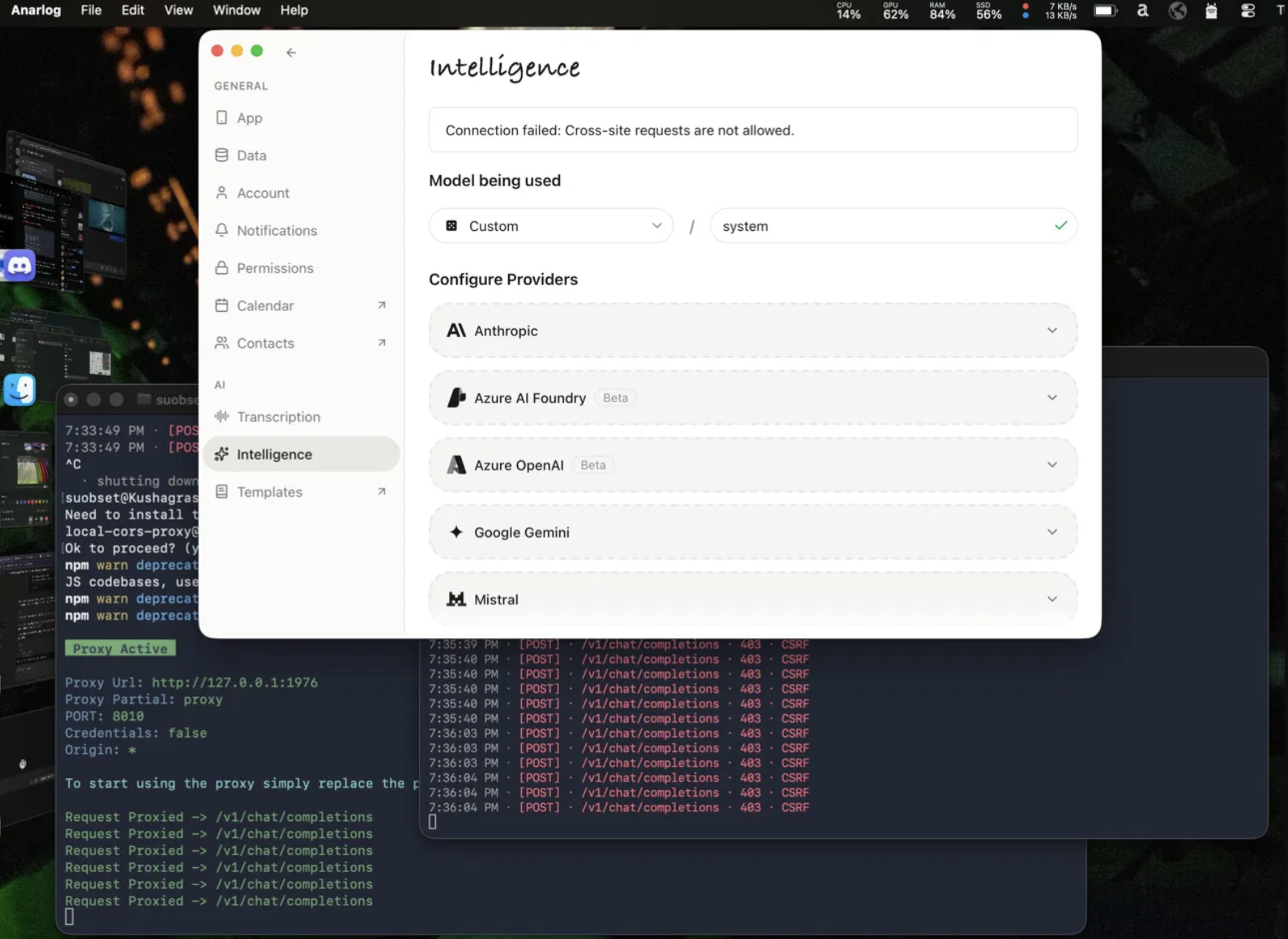
This is a CSRF (Cross-Site Request Forgery) protection error, and it’s worth understanding what’s actually happening here. When a web page or native app makes an HTTP request to a server running on localhost, the browser (or in this case, the app’s networking layer) attaches an Origin header describing where the request is coming from. Anarlog is an Electron-based app, so its Origin looks something like file:// or an internal app scheme — something that is definitively not http://127.0.0.1:1976. The fm server sees that mismatch and rejects the request outright with a 403, before it even looks at the payload.
The instinct here is to reach for a CORS proxy. CORS (Cross-Origin Resource Sharing) is the browser-level mechanism that controls which origins are allowed to read responses from a server. A CORS proxy sits in the middle and adds permissive Access-Control-Allow-Origin headers to every response, telling the client “yes, you’re allowed to read this.” I tried this with npx local-cors-proxy, and while it does forward requests and the curl test confirms the chain works end-to-end:
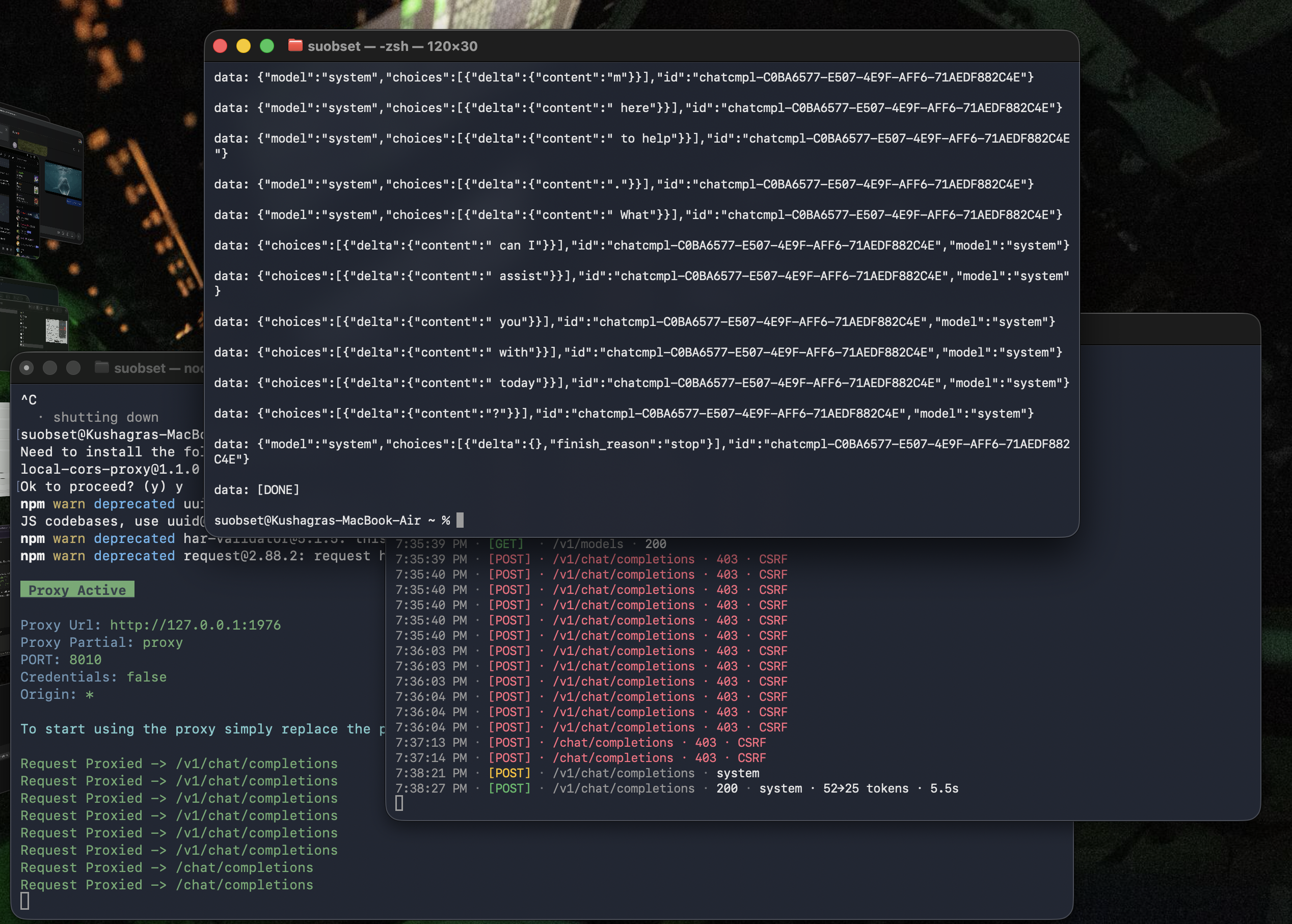
— Anarlog still failed. The reason is subtle but important: a CORS proxy only modifies the response. It adds headers on the way back out. But the fm server’s CSRF check happens on the request — specifically, it looks at the Origin header that Anarlog sends on the way in, before any response is generated. No amount of response header manipulation fixes that.
What we actually need is a proxy that rewrites the request Origin header before fm ever sees it — making it look like the request originated from fm itself. That’s where nginx comes in. Unlike local-cors-proxy, nginx lets you rewrite arbitrary request headers via proxy_set_header, which means we can replace whatever Anarlog sends with http://127.0.0.1:1976, and fm sees a perfectly legitimate same-origin request.
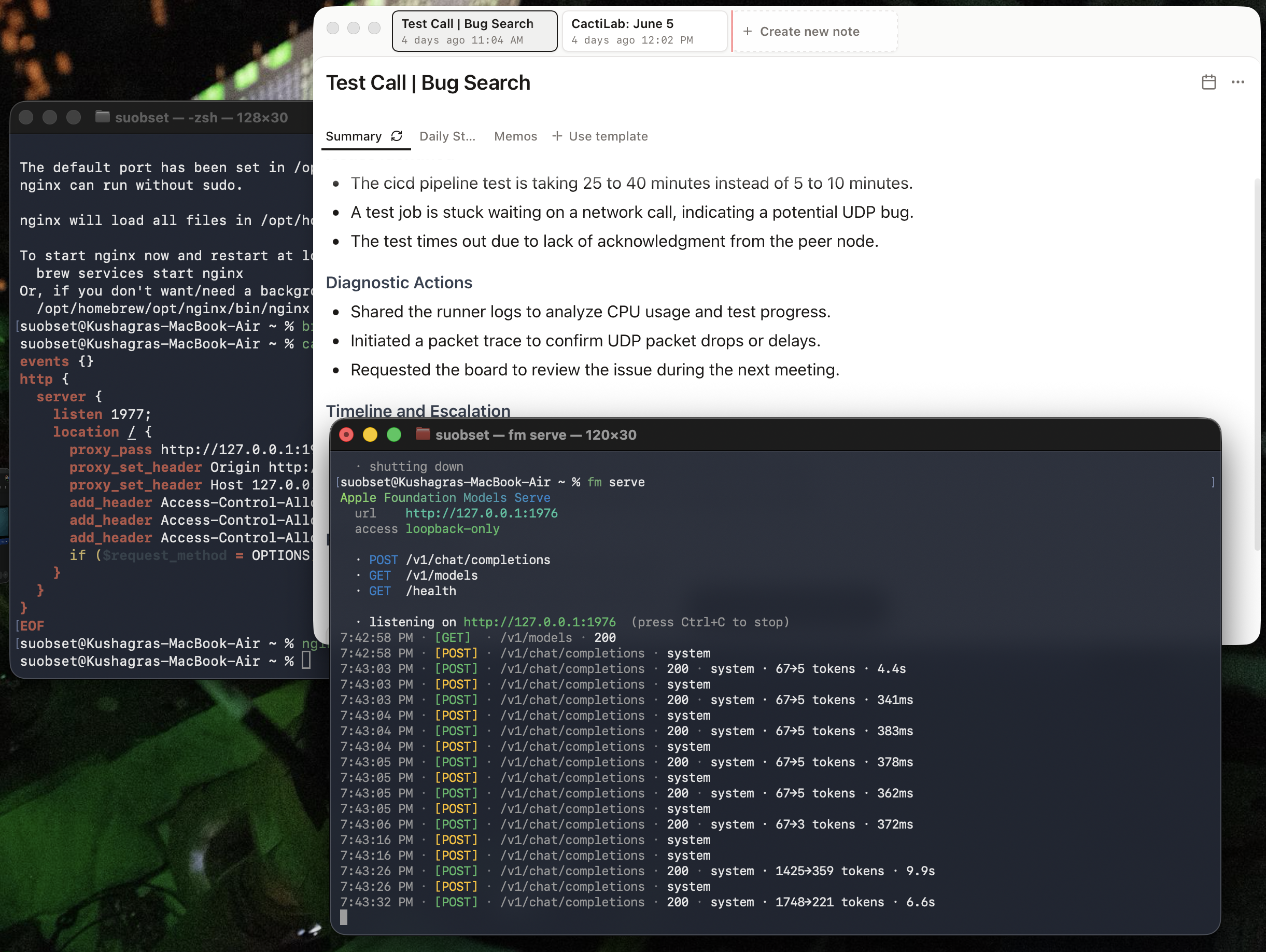
The full config, saved to /tmp/fm-proxy.conf:
events {}
http {
  server {
    listen 1977;
    location / {
      proxy_pass http://127.0.0.1:1976;
      proxy_set_header Origin http://127.0.0.1:1976;
      proxy_set_header Host 127.0.0.1:1976;
      add_header Access-Control-Allow-Origin *;
      add_header Access-Control-Allow-Methods 'GET, POST, OPTIONS';
      add_header Access-Control-Allow-Headers 'Content-Type, Authorization';
      if ($request_method = OPTIONS) { return 204; }
    }
  }
}
Run with nginx -c /tmp/fm-proxy.conf. The proxy_set_header Origin line is doing all the real work — it overwrites Anarlog’s origin with fm’s own address before the request hits the CSRF check. The add_header Access-Control-Allow-* lines on the response side are there for good measure, since Anarlog may also do a CORS preflight OPTIONS check before the actual POST. The if ($request_method = OPTIONS) { return 204; } short-circuits that preflight immediately so it doesn’t stall.
With nginx running on 1977 acting as the middleman, point Anarlog at http://127.0.0.1:1977 with any dummy API key. The model name field should be set to system to use the on-device Foundation Model, or pcc to route through Private Cloud Compute instead.
With these changes, and despite a minor “invalid JSON” error, Anarlog is actually able to identify the model and successfully generate summaries using entirely Apple’s Foundation Models on system!!

Now, let’s generate the summary again on the dummy call, using the on-system Apple Foundation Model:

You can see the GPU spiking in the menu bar widget — that’s the M4’s GPU doing inference entirely on-device, no network request leaving the machine. The fm logs show 200 · system · 1748→221 tokens · 6.6s: 1748 tokens of meeting transcription going in, 221 tokens of summary coming out, all processed locally in under 7 seconds on a base M4 MacBook Air with 16GB of RAM.
The result is a full meeting summary — same quality as what you’d get routing through a cloud provider — with zero data leaving the machine, zero API cost, and zero contribution to data center load. The entire pipeline: microphone capture, transcription, summarization, and storage, runs locally.
When I am done, I can just nginx -s stop. This now means that I can use Apple Intelligence Foundation Models with my meeting note-taker, with OpenCode (open source agentic coding harness), and so on. For having just 256GB on board, not needing multiple models to do the same thing is a game changer.
I’ll now try to see if I can open a PR for Anarlog, or make something a little less janky.